GoService: An App Designed for College Volunteers
My Role: UX Designer, Researcher
Team Size: Individual Project
Springboard UX Design Online Course
Duration: Jul, 2018 – Sep, 2018 (2.5 months)
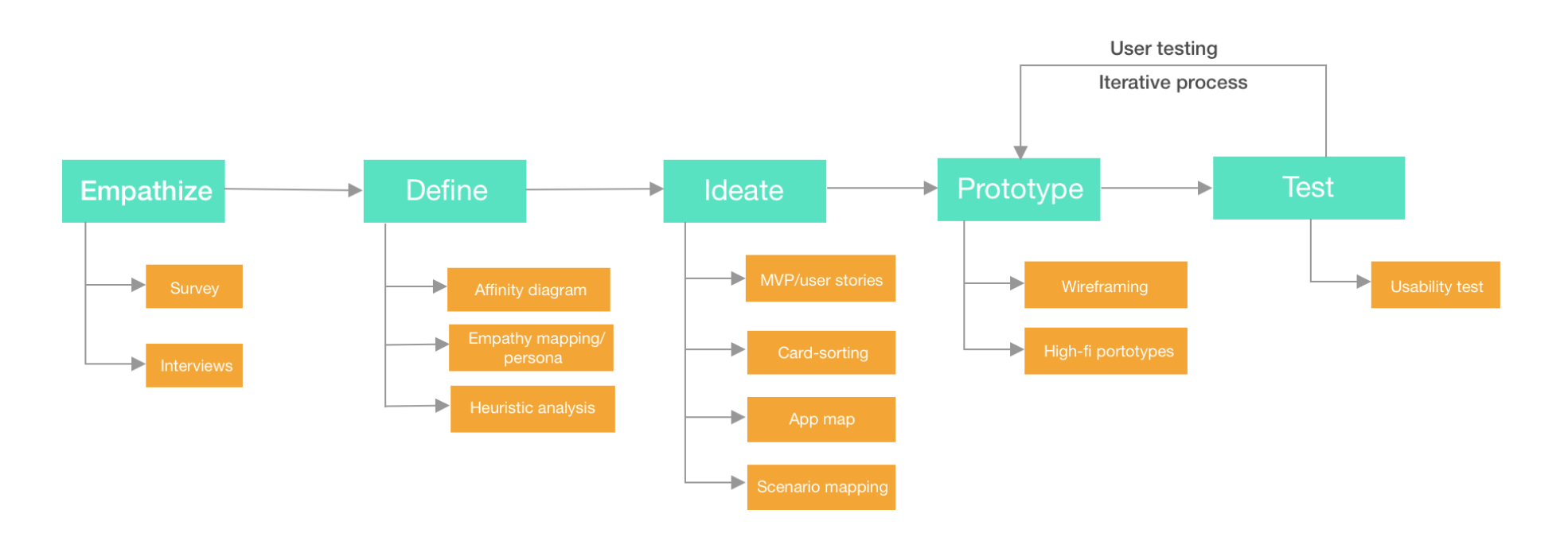
Techniques used: Survey& Interviews; Affinity diagrams; Persona & Empathy mapping; MVP& User stories; Card-sorting; Wireframes; User flow; Digital prototypes; User testing; Style guide
Background
I still remembered myself browsing websites to find service opportunities that I was interested in or related to my professional interests during my freshman year. It was a daunting experience. Doing community service is such a fulfilling experience and it should not take long to find those opportunities. There was no social networking app designed for college students to find volunteering opportunities. An application could have been so helpful for them. In 2018 summer, I initiated the idea of designing a social networking app to help students find the right service opportunities.
Process
Empathize
Do students enjoy doing community service?
What are those motivations for those actively participating in service opportunities?
What are their pain points when looking for the right service opportunity?
Survey
I used google form to distribute survey questions and collected 30 survey responses totally. The results are shown below:
My results showed:
People enjoy doing community service: 97% of participants enjoy their last community service experience. 65% of participants answered they would go to another community service if there is a chance.
Time and the lack of opportunities related to their interest: 48% of the people indicated that they don’t have enough time to do volunteering; 23% of people answered that there were not enough volunteering opportunities related to their interest.
In-depth interviews
Survey results validated my initial hypothesis: people enjoy doing community service but their tight schedule during the semester and limited available options prohibit them from doing service. In order to define the problem statement better, I selected 5 participates who showed strong interest towards community service for an in-depth interview. I asked about their motivations for doing community service and how those experience have changed their perspectives.
Below are some quotes from my interviewees showed their motivation of volunteering:
By doing volunteering, I became more aware of the issue area and gained more experience working with the group that I am helping with.
I feel I am making real impacts to the community compared with simply making donations.
I feel more engaged with the organization that I am in and be able to fulfill required service hours.
Volunteering is a way to make friends and grow personal connections.
Students like to do volunteering mainly because of those reasons: make a direct impact; socialize with people who have the same interest; fulfill certain service hours; learn new skills.
Define
I synthesized my findings using affinity wall and brainstormed design implications based on those findings:
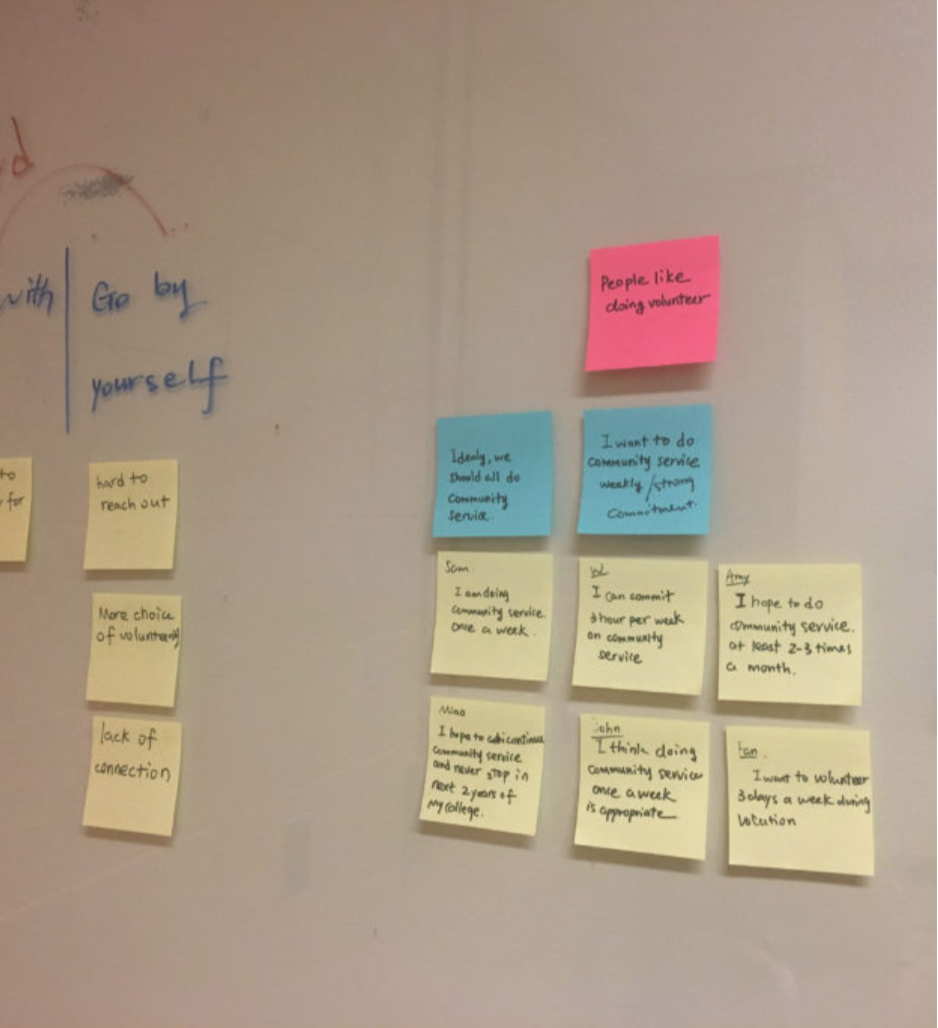
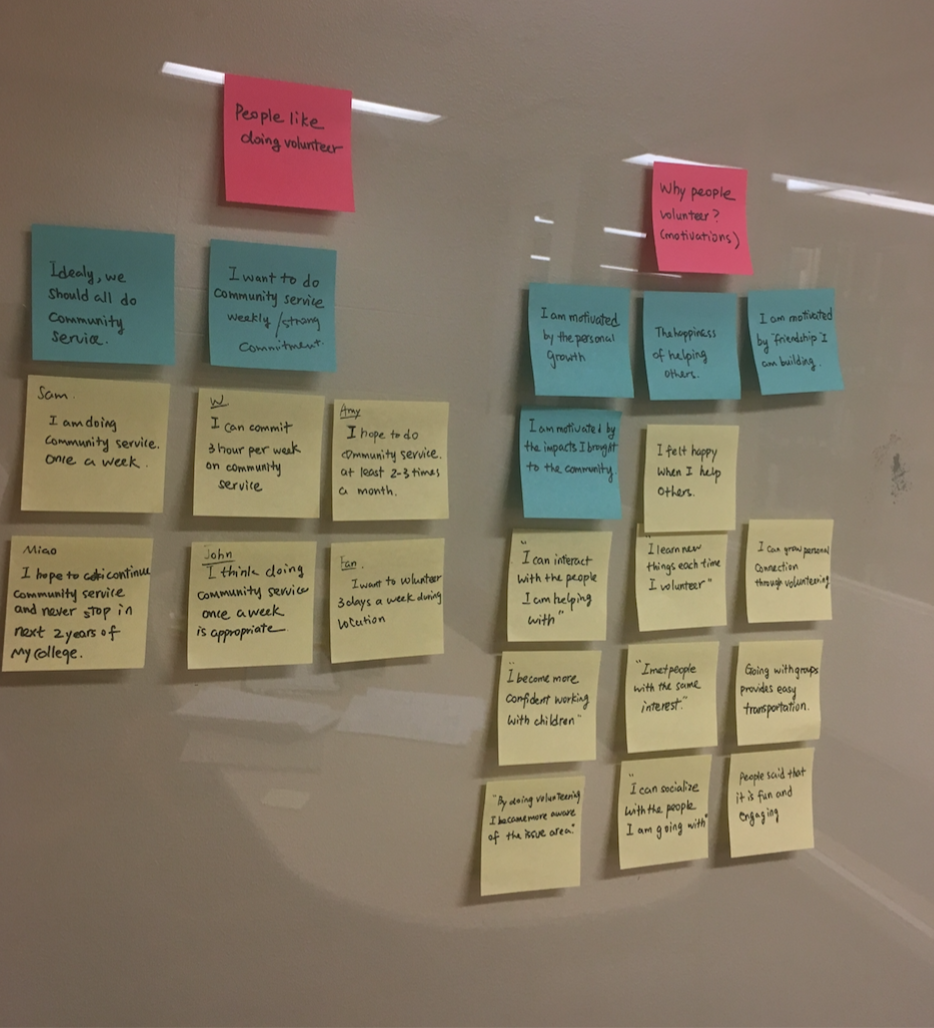
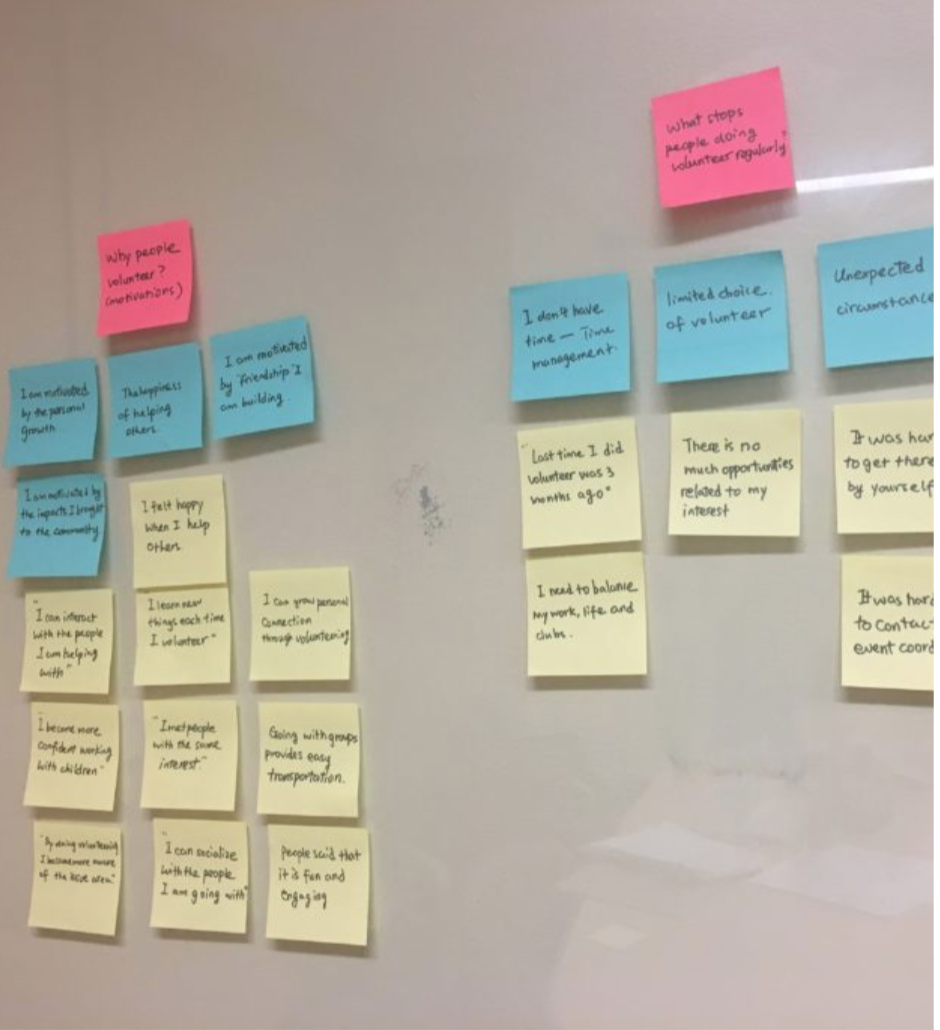
Implication 1: A calendar visualizing upcoming volunteer opportunities allows the user to manage their time better.
Implication 2: showcase new opportunities weekly in the search page.
Implication 3: Match the user with the volunteering options based on their interests.
Implication 4: Reviews from the past is an important consideration for the user to decide whether they want to choose to register for the event or not.
Implication 5: People might feel frustrated when the sign-up and registering process took too long. The ease of scheduling and contacting the volunteering site is an important factor to motivate them continue volunteering.
Finding 1: Time seems to be the biggest reason that stopped the participant to do community service again. 3 out of 5 interviewees indicated that they don’t have enough time for volunteering.
Finding 2: 5 interviewees indicated that they want to do community service regularly, at least 3~4 times a month.
Finding 3: Some participants indicated that they were unable to find volunteer opportunities related to their interest. They wish they knew more volunteering choices.
Finding 4: Most interviewees indicated that the last time they volunteered is because “other people told them it was a fun and rewarding experience”. Additionally, participants also indicated that if they knew more details about the event would help them make the decision.
Finding 5: Easy transportation and easy scheduling system. Participants indicated that they like to go to volunteer because of the easy scheduling system on their website.
Based on my synthesized findings from Interviews, I built two personas and two empathy maps to represent two groups of users that I decided to design for:
Person 1
Person 2
Empathy map for persona 1
Empathy map for persona 2
Ideate
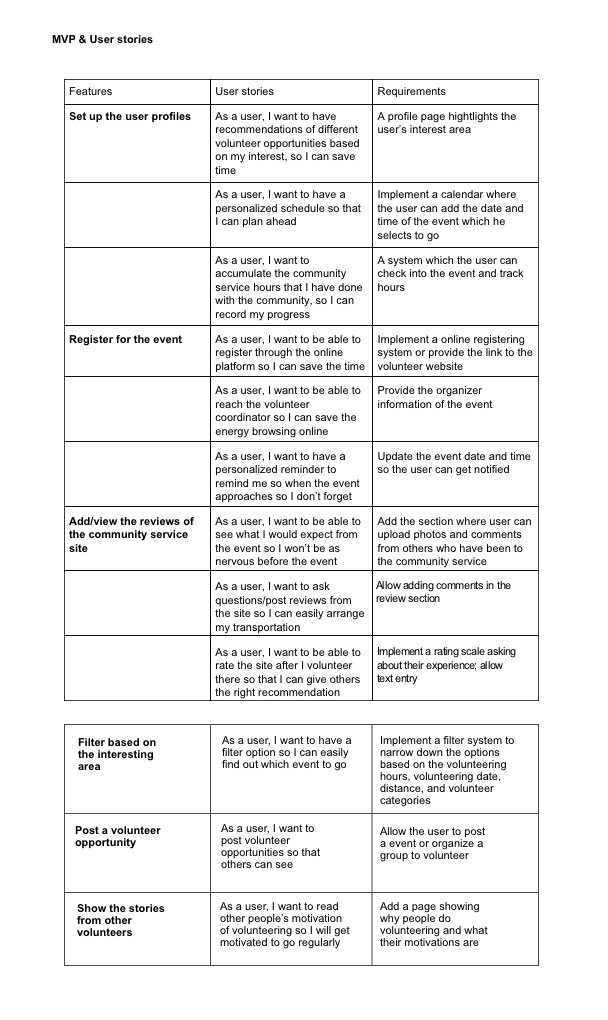
MVP and user stories:
Minimum Viable Product and user stories are great ways to validate a hypothesis. By putting myself into the users’ shoes, I developed the mindset of human-centered design and reconsider user needs before designing a product.
Card-sorting
To better organize the content and hierarchy of the app, I conducted card sorting by using optimalworkshop.com to design the information architecture. The total 6 responses from participants were shown below.
Similarity Matrix & Dendrograms (Best Merge Method)
I found out there are five common categories recognized by the user and also meaningful for designing the app map: On-boarding activity; Discover new opportunities; Create a new opportunity; Features helped with motivations; Profile page. In order to better fulfill user needs, I added the saved collections category when designing the app map.
Below is the final app map that I designed:
Scenario mapping
Before starting the low-fi prototypes, I created four possible scenarios about how the user might interact with my app
Low-fi Prototyping
Low-fi Wireframes and prototyping
I used Balsamiq to wireframe 14 pages and conducted low-fi prototypes by using the linking feature of Balsamiq. Below are the wireframe pages:
User Testing
After creating the low fi prototypes, I tested with 3 users to gain feedback and I also gained feedback from Springboard mentor. Here are some changes that I wish to make in future designs:
There weren’t hints for the user to notice they have finished sign-up and being brought back to the login page, adding a confirmation page would be useful.
The create event page seems to have different content from the event details page, which I would adjust later.
When the user completed registration, sometimes they would forget to sign in to the event and check their hours. It might be useful to send them reminders before the event starts. I would add a checkbox in the registration page to ask them whether they want to receive reminders.
For the event details page, the review session and ask the question box were confusing to most users, they didn’t know the difference between those two. In future prototypes, I would change the wording of these two user flow.
Some users also suggest to add contact info into the event details page, but due to the limited space, I decided to include that into the About session.
The profile page might need some redesign of the pop-up window to make it more mobile-friendly.
Final Design
After a series of interactive testing and redesign, I created the user flow and digital prototypes:
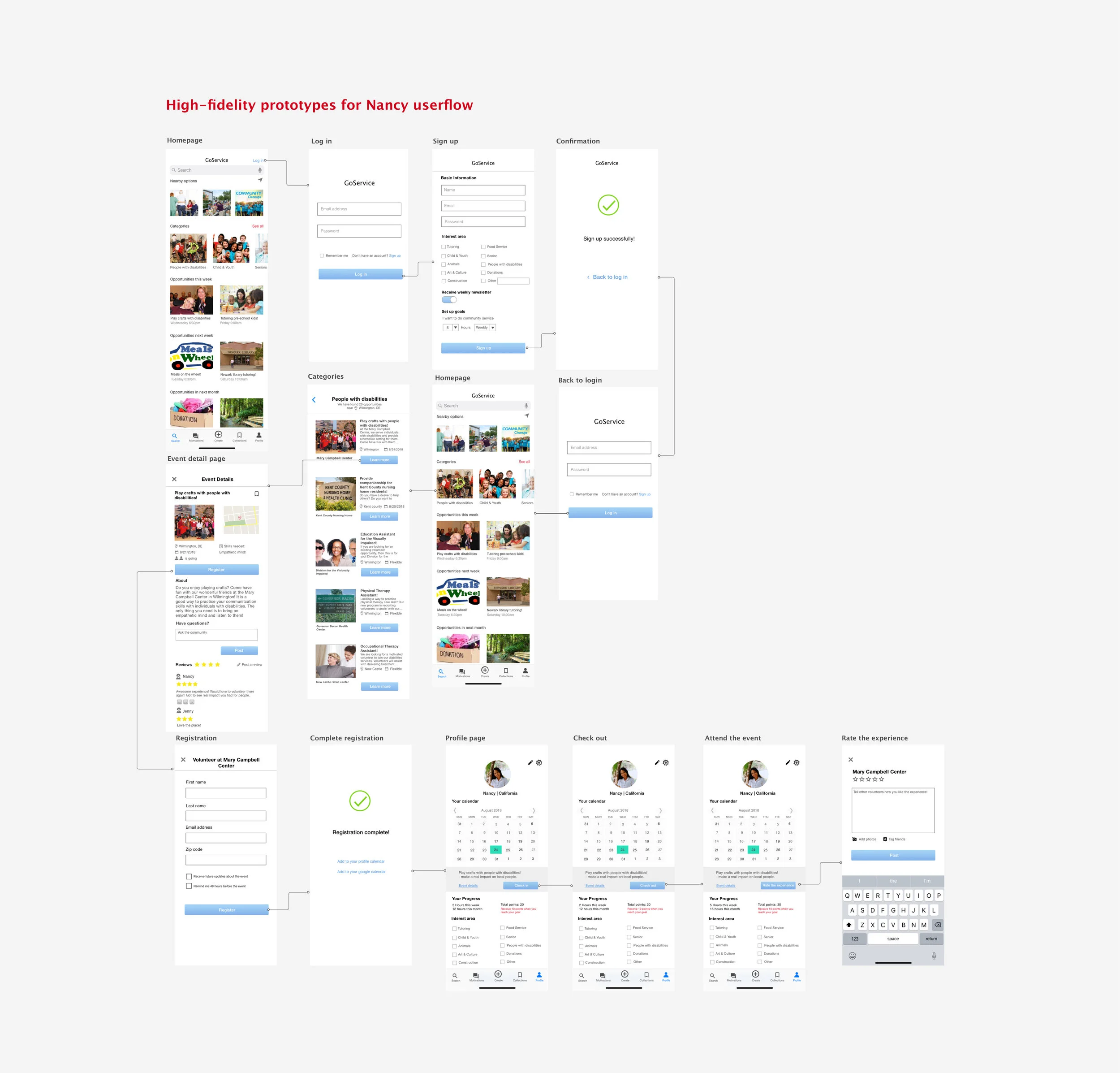
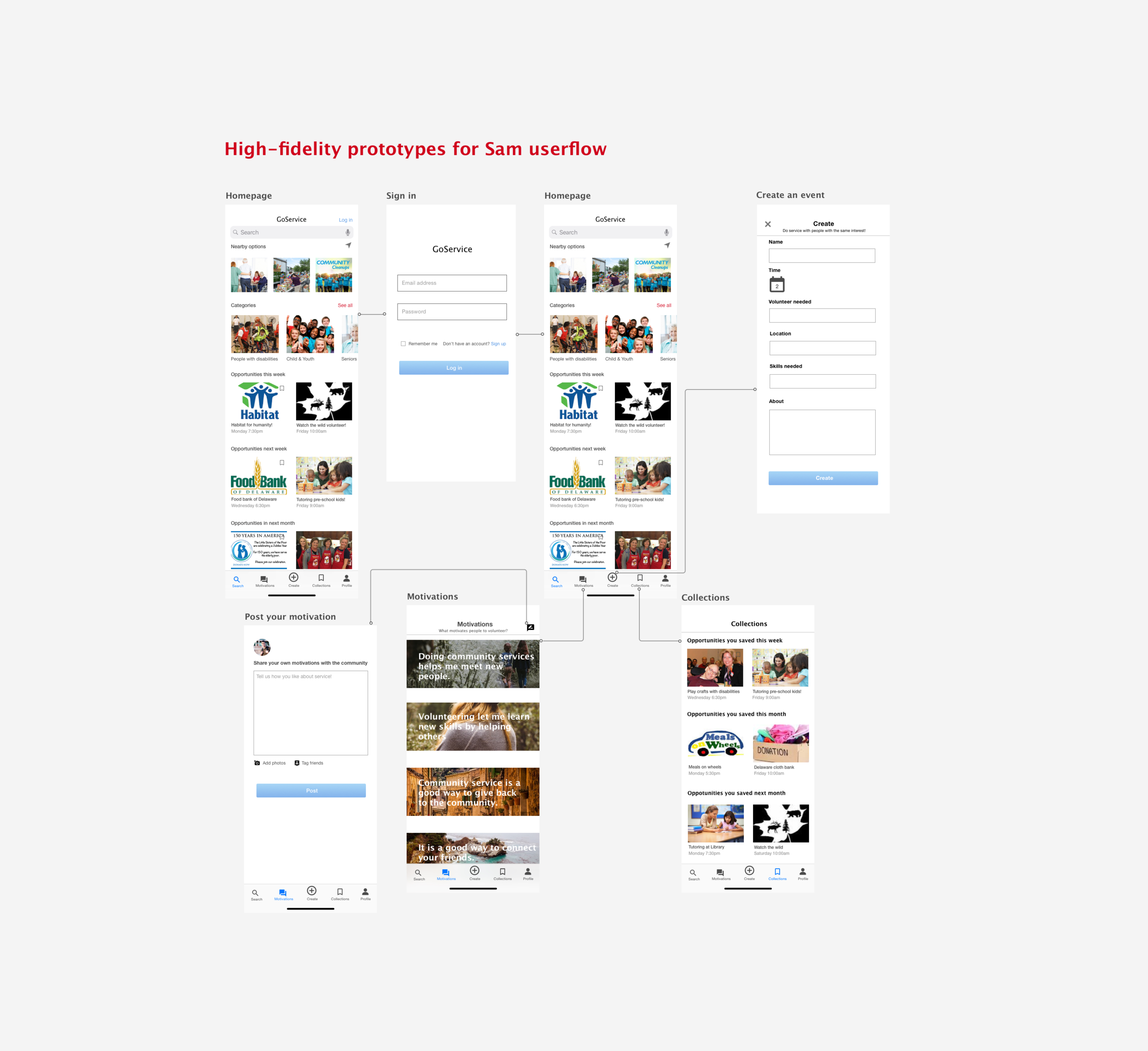
Please click the InVision link for digital Prototypes.
Impact
With the help of GoService, students will be able to set up their interested areas and track their service hours weekly on the profile page. They will also be able to register for a volunteer opportunity through the easy registration system embedded in this app. The homepage filters out volunteer opportunities based on their profile and showcases different categories of community service according to their location. Moreover, students can choose to view opportunities for the current week, for next week and next month to plan ahead on their schedule. The ultimate goal of this app is to motivate students to do community service, provide accessible volunteering information, and easily connect the opportunity providers with students!